 Convoseal
How to save an iMessage conversation on iPhone
Updated:
To keep an iMessage conversation as a document, there is no one-tap save on iPhone. A backup protects your messages inside your phone, while a PDF lets you read, share or archive the conversation anywhere. Here is how to get there.
What you can do for free
- Keep Messages in iCloudIn Settings, tap your name, then iCloud, and check that Messages is turned on, depending on your iOS version. This syncs and protects your messages across your Apple devices. It does not give you a file.
- Change how long messages are keptIn Settings > Messages, look at Keep Messages. If it is set to 30 days or 1 year, older messages disappear. Choose Forever if you want to keep them.
- Take screenshotsCapture the screen, scroll, repeat. Slide the conversation to the left to show the time of each message before you capture.
The limits
An iCloud backup is not a readable document: you cannot open it as a conversation outside Apple's apps. Screenshots stay as loose images, hard to order and search. And if someone deletes a message, a screenshot is all that remains of it, so capture early. Third-party extraction tools exist, many of them paid and some needing a computer. We leave them out here.
Make a PDF with Convoseal
- Start in ConvosealOpen the app and choose iMessage.
- Record the threadAdd Screen Recording to Control Center in Settings if it is missing, then start recording and scroll up through the conversation in small, even movements.
- Analysis on the deviceThe app reads the video with Apple's text recognition, on your iPhone. Stay in the app until it ends.
- Who is who?Pick your side of the conversation and look over the messages that Convoseal marks as doubtful.
- Preview and exportFree preview of page 1. The PDF numbers and dates every message, appends your original images, and adds a page with each file's SHA-256 fingerprint.
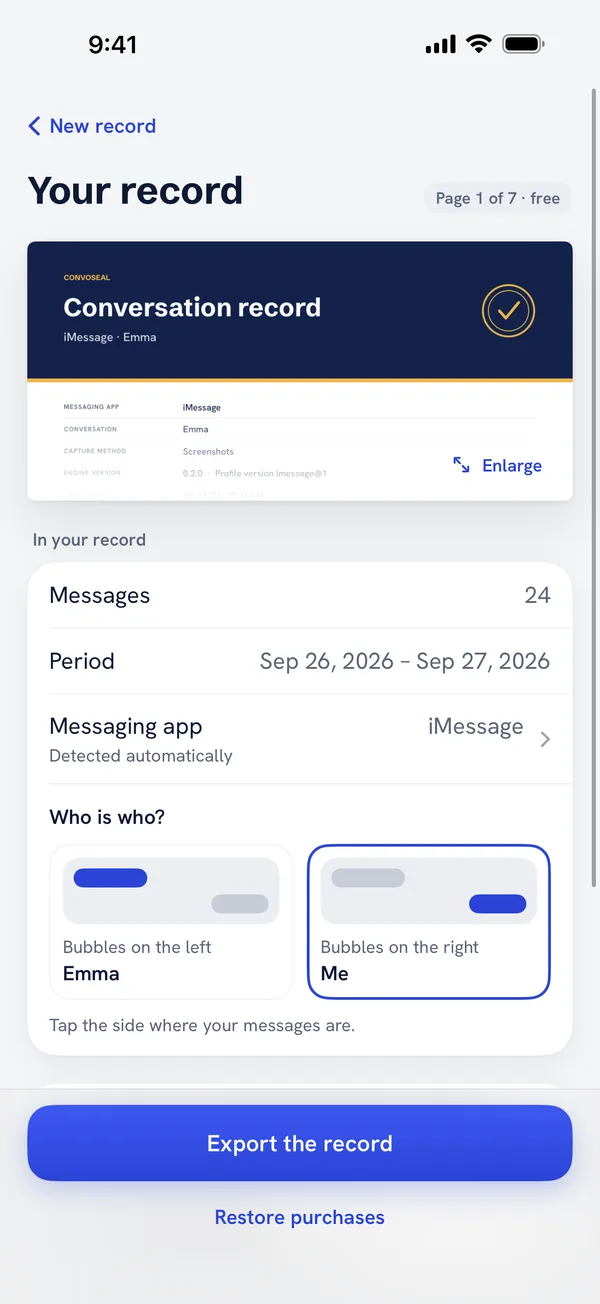
Be aware of what the result is. It is a faithful layout of what was on your screen, after a review you did yourself. The fingerprint shows that the PDF has not changed since it was created. It cannot show that the original messages were authentic. Your recordings and screenshots are not deleted unless you confirm.
The page 1 preview is free. Back to the home page. If your messages are green bubbles, this guide on SMS and iMessage to PDF goes further.
FAQ
Is an iCloud backup enough?
It protects messages from loss, but you cannot read it as a conversation outside your Apple devices. A PDF serves a different purpose.
What if the other person deletes messages?
On your device, a message deleted on their side normally stays unless a setting removes it. Capture early if a conversation matters to you.
Do I need a Mac?
No. The whole process runs on your iPhone.
Try it on your own conversation
Preview page 1 of your PDF for free. Everything is processed on your iPhone or iPad: no account, nothing uploaded.
Other guides
WhatsApp, Telegram, Signal, Messenger, Instagram, iMessage and Apple are trademarks of their respective owners; Convoseal is not affiliated with them. Convoseal does not give legal advice.