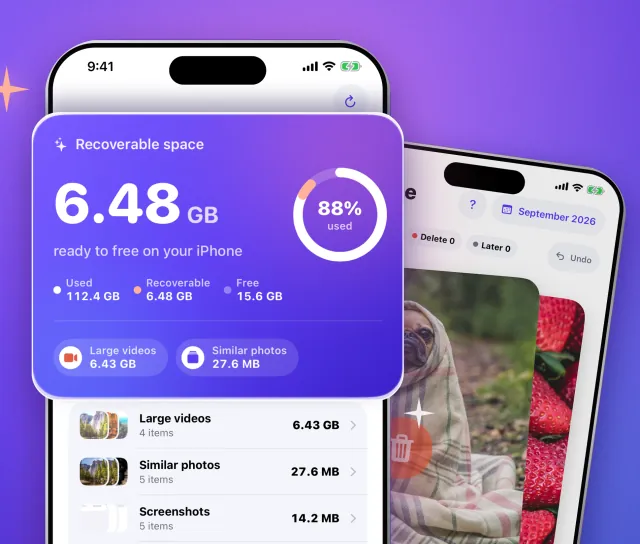
Tidyo finds duplicate photos, similar shots, blurry pictures, screenshots and huge videos, and shows you what's taking up space. You decide what goes. Everything stays on your iPhone.
Free download · iPhone · iOS 17+
No account
No ads
No tracking
100% on-device
iPhone storage full?
See what fills your iPhone, then choose what goes.
"Storage almost full" usually means years of photos, bursts, screenshots and long videos. Tidyo sorts them for you in one scan, without uploading anything, and never deletes blindly.
One scan, every category
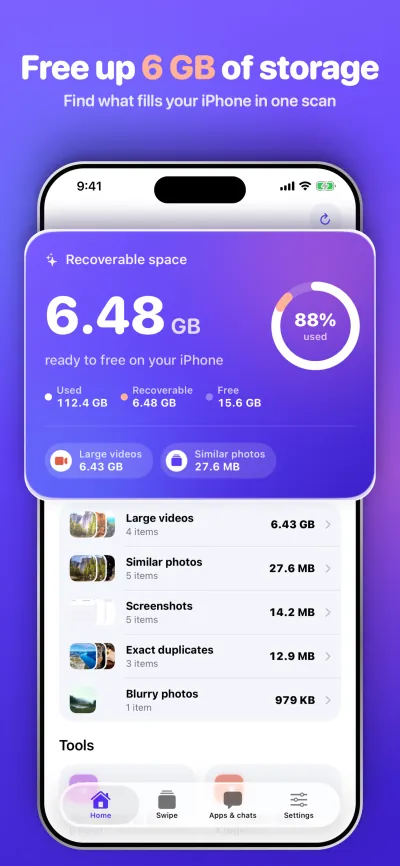
Duplicates, similar shots, blurry photos, screenshots, Live Photos and large videos, each in its own list with its size.
You pick, iOS confirms
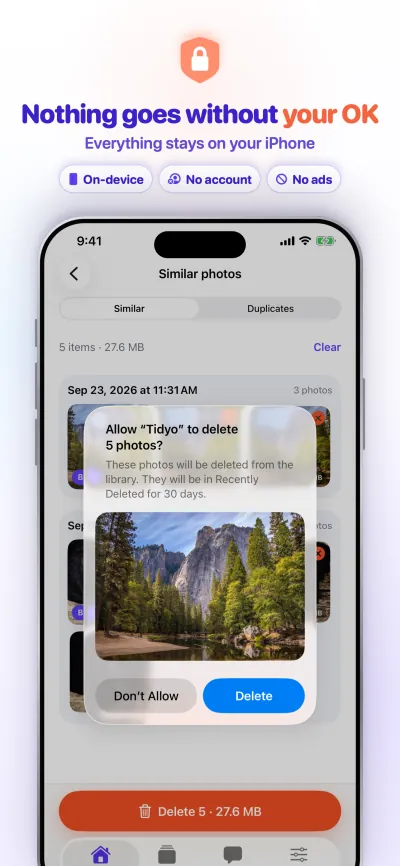
You always see the count and size of what's selected. Nothing goes until you confirm in the iOS alert.
Undo for 30 days
Deleted items go to Recently Deleted. Empty it when you're sure, and the space is back.
Screenshots
A closer look at Tidyo
Every screen as it appears in the app. Swipe to see them all.
Features
Everything you need to free up iPhone storage
Built for the photo library first, with the tools that matter when your iPhone is full.
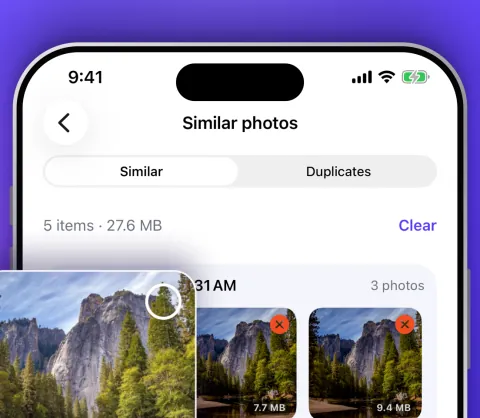
Smart scan: delete duplicate photos, similar shots and blurry pictures
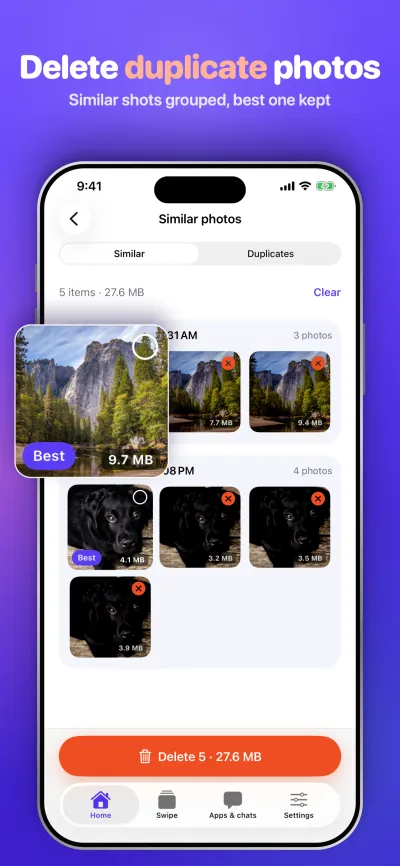
Duplicates found with a strict multi-check (image hash, aspect ratio, colour signature and Vision feature print), so look-alikes aren't flagged as copies.
Similar photos and bursts grouped, with the best shot picked for you to keep.
Blurry photos, screenshots, large videos and Live Photos, each in their own list.
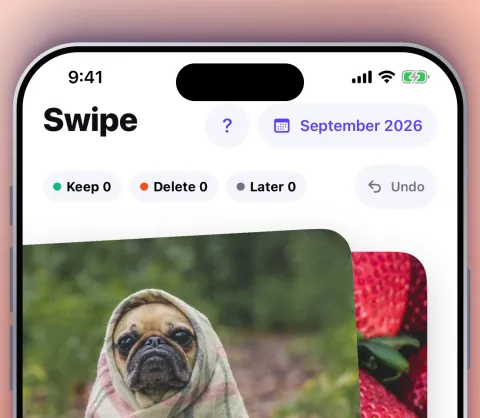
Swipe to sort your camera roll
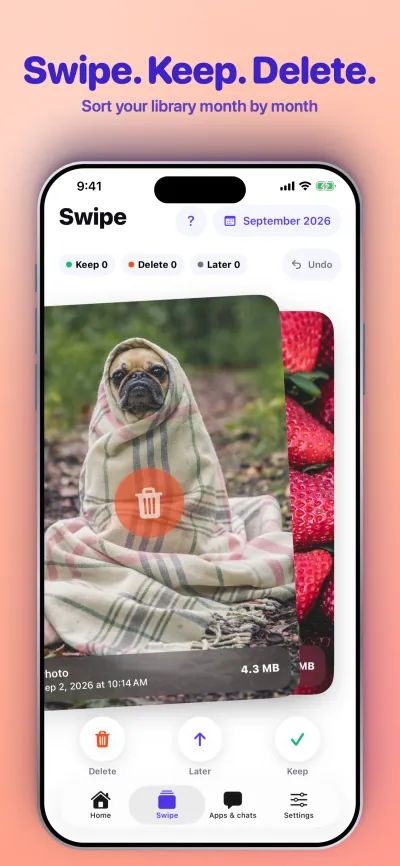
Go through your library month by month. Swipe left to delete, right to keep, up to decide later. Tidyo remembers your choices, so you never review the same photo twice.
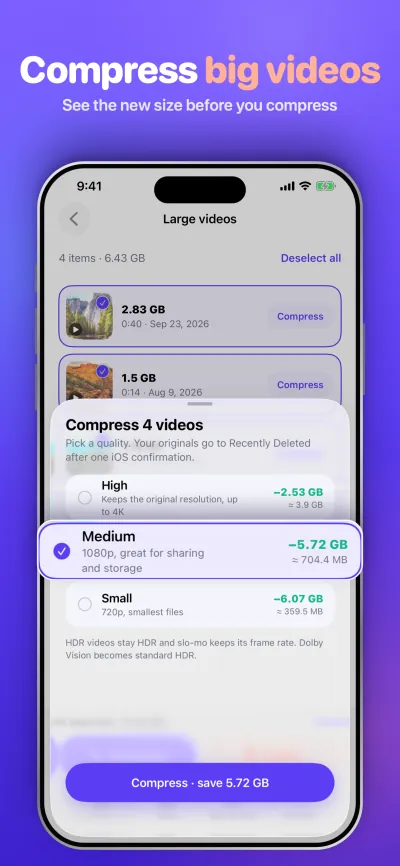
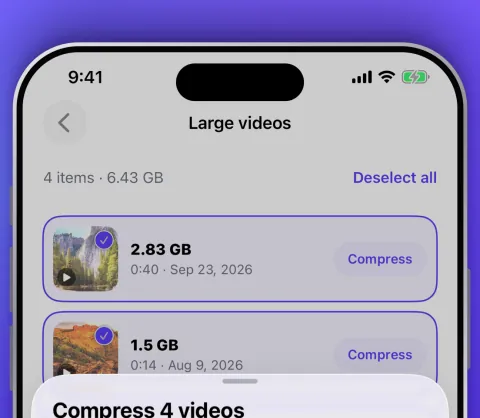
Compress videos on iPhone
High, Medium or Small (HEVC), with the estimated size shown first.
Batch compression, even in the background on iOS 26.
HDR and slow-motion preserved. If iOS interrupts, Tidyo offers to resume.
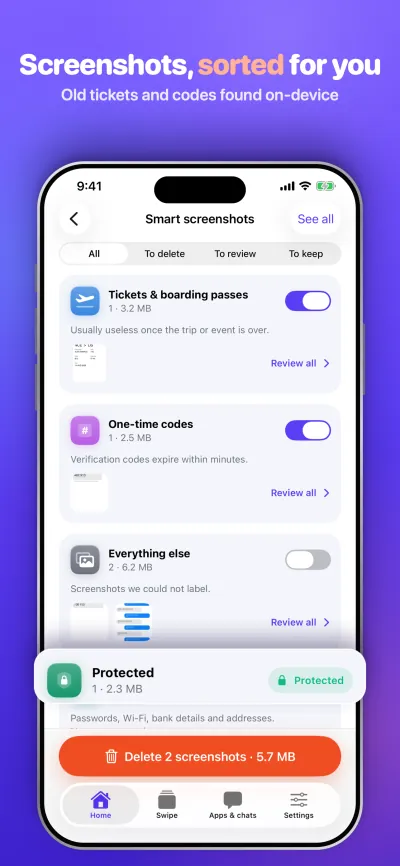
Smart Screenshots Pro
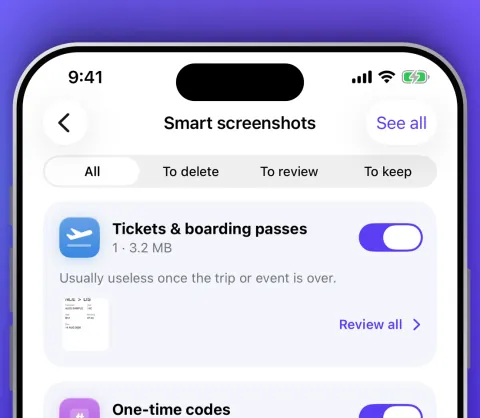
Tidyo reads your screenshots on-device and groups them into expired tickets, one-time codes, conversations and others. Screenshots with passwords or bank details are marked Protected and never suggested for deletion.
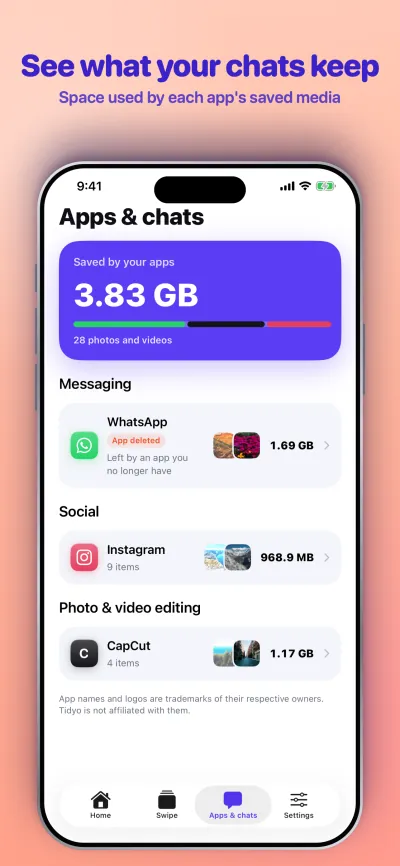
Apps & chats: clean WhatsApp photos and more
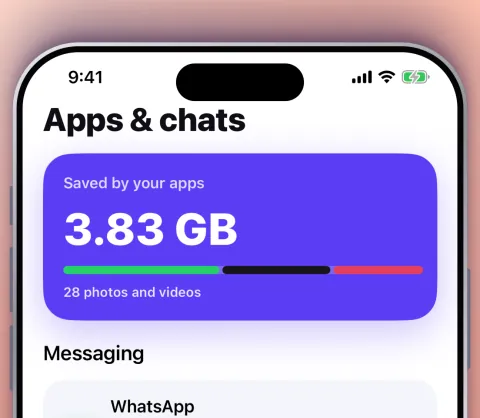
See how much space the media saved by WhatsApp, Telegram and other messaging and social apps takes in your library, album by album, including media left behind by apps you've deleted.
Documents to PDF Pro
Tidyo finds photos of paper documents (receipts, letters, forms) and merges them into a single PDF, right on your phone.
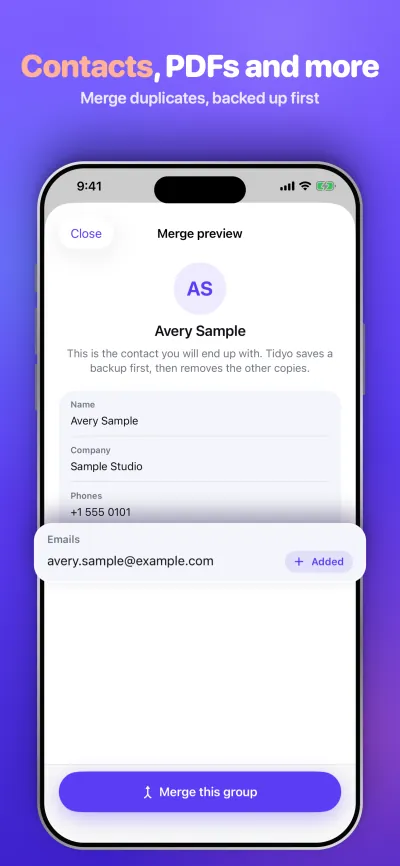
Merge duplicate contacts Pro
Merge duplicate contacts into one complete card.
Spot incomplete contacts.
Automatic .vcf backup before any change, plus .vcf import.
Try one merge or cleanup for free.
Resale mode
A 7-step checklist to sell or hand over your iPhone safely: back up, sign out, remove your eSIM, erase all content and settings.
Private by design
Everything happens on your iPhone.
A cleaner sees your whole photo library, so it should never send it anywhere. Tidyo doesn't. All analysis runs on your iPhone, with Apple's frameworks.
On-device analysisHashes, blur and document detection, and screenshot text recognition never leave your phone.
No accountOpen the app and start. No sign-up, no email, no login.
No ads, no trackingNo analytics, no advertising and no third-party SDKs. Data not collected.
Nothing goes without your OKYou see what's selected and confirm with iOS. 30 days to change your mind.
Allow photo access. Tidyo scans your library on your iPhone and shows how much space you can recover, category by category.
Review
Open a category, swipe or tap to choose. The best shot is already kept, and you always see the count and size of what's selected.
Confirm
Confirm in the iOS alert. Items go to Recently Deleted. Empty it when you're sure, and enjoy the free space.
Free and Pro
Free to scan. Pro when you need more.
Free
Full scan of your photo library
Clean up to 500 MB of photos and videos, compression included
One contact merge or cleanup to try
No account needed
Tidyo Pro
Unlimited cleaning
Smart Screenshots, Documents to PDF and Contacts cleanup
Weekly plan with a 3-day free trial
Yearly plan, or a one-time lifetime purchase
Prices are shown in the app before you buy. Subscriptions renew automatically unless cancelled at least 24 hours before the end of the current period. Manage or cancel anytime in Settings › [your name] › Subscriptions. The lifetime purchase is a one-time payment with no renewal.
FAQ
Questions about iPhone storage and Tidyo
How do I free up storage on my iPhone?
Open Settings › General › iPhone Storage to see what takes the most space. Photos and videos are usually the biggest part.
Tidyo scans your library on your iPhone and groups duplicates, similar shots, blurry photos, screenshots and large videos so you can review and delete them, or compress big videos. Then empty Recently Deleted in Photos to get the space back right away. For apps you rarely use, Offload App frees space and keeps their data.
Why is my iPhone storage still full after deleting photos?
Deleted photos and videos stay in the Recently Deleted album for 30 days, and they still use space during that time. Open Photos › Recently Deleted (under Utilities), tap Select, then Delete All to free the space now.
How do I delete duplicate photos on my iPhone?
The Photos app shows exact duplicates in Utilities › Duplicates. Tidyo goes further: it finds duplicates with a strict multi-check (image hash, aspect ratio, colour signature and Vision feature print) so look-alikes aren't flagged as copies, and it groups similar shots and bursts with the best one picked for you to keep. You review each group and confirm before anything is deleted.
How do I compress videos on my iPhone?
In Tidyo, pick one or several videos, choose High, Medium or Small quality (HEVC) and check the estimated size before you start. HDR and slow-motion are preserved. After one iOS confirmation the compressed copies replace the originals, which go to Recently Deleted.
Can Tidyo clear WhatsApp's cache?
No. iOS doesn't let any app clear another app's cache or internal storage, and any app that claims to is overselling. What Tidyo can do is find the photos and videos that WhatsApp and other messaging apps saved to your photo library, album by album, so you can delete the ones you no longer need.
To clear media stored inside WhatsApp, open WhatsApp › Settings › Storage and Data › Manage Storage. To stop new media landing in Photos, turn off Save to Photos in WhatsApp › Settings › Chats.
Does Tidyo upload my photos?
No. All analysis runs on your iPhone with Apple's frameworks. Your photos, videos and contacts never leave your device. Tidyo has no account, no ads, no analytics and no tracking. See the privacy policy.
Will Tidyo delete anything without asking me?
No. Nothing is deleted without your OK. You see exactly what's selected, with the count and size, and you confirm in the iOS alert. There's no one-tap "clean" that deletes things you haven't seen.
Can I recover photos I deleted with Tidyo?
Yes, for 30 days. Tidyo deletes through the Photos library, so items go to Recently Deleted. Open Photos › Recently Deleted, select the items and tap Recover. Once Recently Deleted is emptied, they can't be recovered. For contacts, Tidyo saves a .vcf backup before any change.
Is Tidyo free?
Yes, to start. Scanning is free, and you can clean up to 500 MB of photos and videos for free, compression included, with no account. You can also try one contact merge or cleanup for free. Tidyo Pro unlocks unlimited cleaning, plus Smart Screenshots, Documents to PDF and Contacts cleanup, with a weekly plan (3-day free trial), a yearly plan or a one-time lifetime purchase. Prices are shown in the app before you buy.
How do I cancel my Tidyo subscription?
Open Settings › [your name] › Subscriptions on your iPhone, tap Tidyo, then Cancel Subscription. Cancel at least 24 hours before the end of the current period to avoid the next renewal. Deleting the app doesn't cancel a subscription. More help on the support page.
Which iPhones does Tidyo work on?
Tidyo works on iPhone with iOS 17 or later and is available in 12 languages, including English and French.
Get your space back today.
Scan for free and see how much you can recover. Your photos never leave your iPhone.
 Tidyo
Tidyo